


RadarOmega: Doppler Radar App
3.21.01K Reviews
App Specs
- Version
- 5.5.3
- Updated On
- License
- $8.99
- Downloads
- 100,000+
- Developer
- SDS Weather INC
- Categories
- Weather
- Platform
- Android, iOS
Screenshots
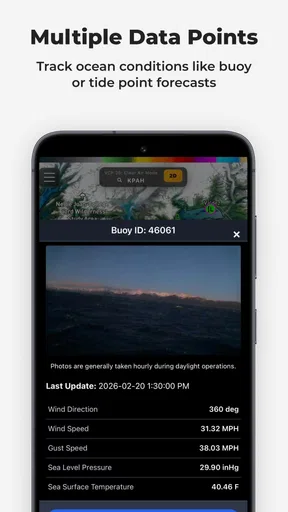
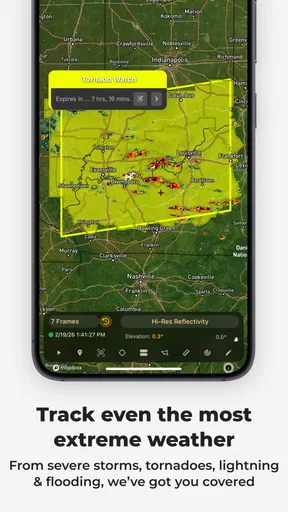
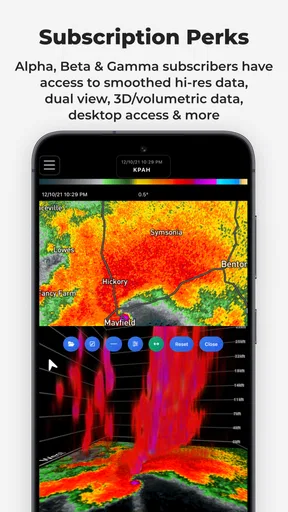
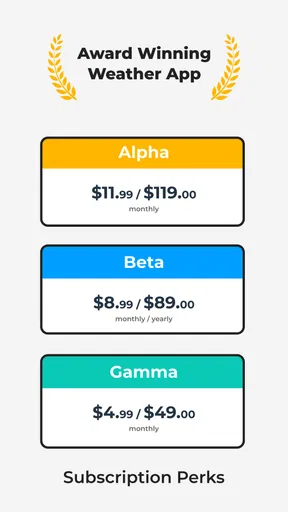
 Analysis by AppCompare
Ever found yourself staring at the sky, wondering if that ominous cloud is just a passing shadow or the beginning of a storm? Well, look no further than RadarOmega, the app that’s taken weather forecasting to another level. As someone who’s always been a bit of a weather geek, I was thrilled to dive into the world of detailed Doppler radar without needing a meteorology degree. Let’s take a closer look at what makes this app useful for weather enthusiasts and casual users alike.
Where the app fits today
RadarOmega is a paid weather app from SDS Weather INC, built around radar rather than the simple glanceable forecast most people use to decide whether to carry a jacket. Its focus is useful when the question is not merely “Will it rain?” but “Where is the weather moving, and is it getting close to the place I care about?” That distinction shapes both its appeal and its learning curve.
The app costs $8.99, and it also offers in-app purchases ranging from $4.99 to $359.99 per item. That is a meaningful commitment beside free weather apps, so I would not buy it just to check a daily high and low. Its 3.4 average from around 1.6K ratings, alongside 963 reviews, suggests a mixed reception rather than universal approval. I’d treat that as a reason to match the app to a real need, not as proof that it will or will not work for you.
It has been available since May 27, 2018, and the current version is 5.5.3. Those facts show that this is an established product with continued versioning, but they do not tell me exactly which features changed between releases. I would separate that history from any expectation about what may come next: the current case for installing it is its radar-centered approach, not a promise of a particular future tool.
Getting Started with RadarOmega
First off, downloading RadarOmega is straightforward on Android and iOS. Once you fire it up, you're greeted with a sleek interface that’s both intuitive and packed with features. Navigating through the app is like having a mini weather station in your pocket. Whether you’re checking the forecast for a weekend hike or tracking a potential storm, it’s all just a tap away.
Features That Stand Out
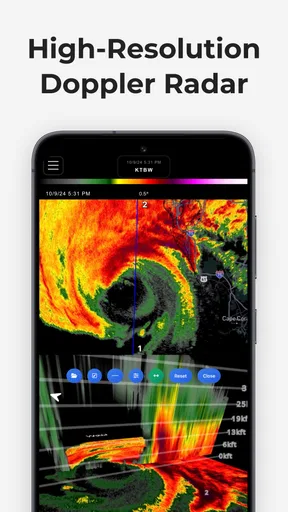
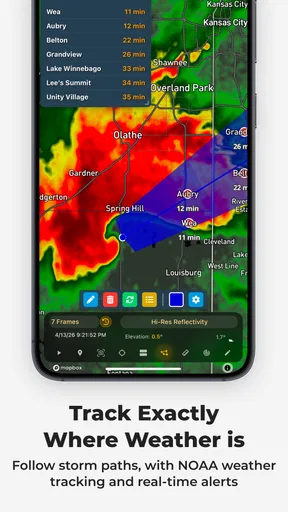
One of the standout features is the real-time Doppler radar imagery. It’s not just any radar; it’s the kind that meteorologists use to track weather patterns. The app offers high-resolution radar data, allowing you to zoom in and see weather activity like never before. Ever wanted to see the exact path of a storm? Now you can.
Another feature I found incredibly useful is the alert system. The app sends you notifications about severe weather in your area, keeping you prepared and safe. Whether it’s a thunderstorm warning or a tornado alert, you’ll be the first to know.
Worth Reading Before You Choose

EA SPORTS FC Mobile 26 Is a Bigger Football Game, but It Takes Time

Flipboard Shows What News Apps Must Do Beyond the Feed

Switching to Android Auto Means Rethinking Your Driving Routine

Google Calendar Makes a Crowded Week Easier to Manage

Ludo King Makes the Most of the Minutes Between Plans

Baby Panda World Brings Quick Play to Modern Phones, but Its Game Library Feels Busy
Using radar without overreading it
A practical way to get value from radar is to use it to answer one specific question at a time. If I’m deciding whether to leave for a walk, I’d check the loop around my location and look for the direction of movement, rather than treating one still image as a forecast. A single frame can make a patch of rain look more threatening or more distant than it is; the sequence is what helps me judge whether it is approaching, passing, or breaking apart.
For a commute, I’d check both the area near home and the area around the destination before setting out. That can reveal why conditions may differ across a short drive, especially when a band of precipitation crosses only part of the route. It is a useful workflow, but radar should not become a reason to ignore official warnings or local safety instructions. The app can help me understand what is happening on a map; it cannot make a dangerous situation safe.
User Experience
Let’s talk about user experience. The app is designed with the user in mind, balancing functionality with an easy-to-navigate interface. You don’t need to be a weather expert to understand what’s happening. The color-coded radar maps and clear legends make it easy to interpret data, even if you’re a newbie.
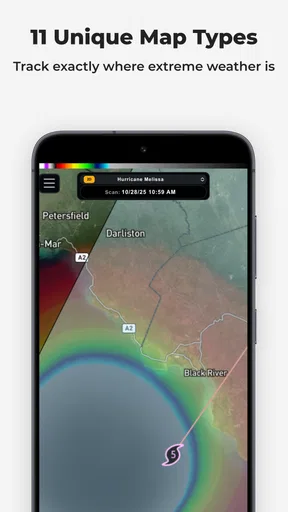
Moreover, the app supports multiple radar sources, including NEXRAD and TDWR, providing users with a comprehensive view of weather conditions. This feature is particularly handy for those living in areas prone to severe weather, giving them multiple perspectives on incoming storms.
What experienced users can get from the extra detail
The choice of radar source matters most when I am trying to inspect a local situation closely, not when I only need a broad sense of the day. NEXRAD and TDWR offer different radar perspectives, so comparing them can be a useful check if nearby coverage or the shape of a storm is hard to interpret. I would still avoid assuming that more layers automatically mean a more certain answer: detail is valuable only when I know what question I am trying to resolve.
A small habit that makes a radar app easier to use is to keep the map focused on places that affect a decision. Save a home area and a regular destination, then compare their conditions instead of repeatedly panning around without a plan. This is especially helpful before a drive or an outdoor appointment, when the important issue is the weather along the next stretch of the day rather than every storm on the wider map.
Customization and Personalization
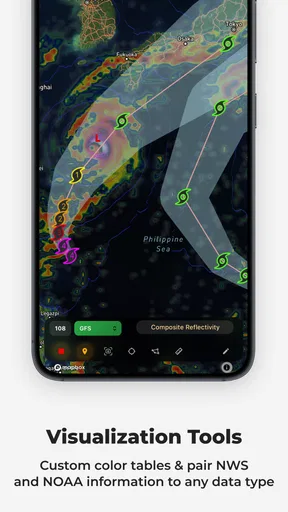
Customization is another area where RadarOmega shines. You can tailor your weather experience by setting up different radar layers, including precipitation type, wind patterns, and even velocity. It’s like building your own weather report, specific to what matters most to you.
Moreover, the app allows you to save your favorite locations, making it easy to check weather conditions for places you frequently visit, whether it’s your hometown or a travel destination.
Who will benefit—and who may not
I think the strongest fit is someone who regularly makes plans around changing weather: a storm watcher, an outdoor worker, a frequent driver, or a person who wants to inspect radar rather than rely only on a generic rain icon. A saved location can make the routine quick, while the ability to change layers gives curious users room to look beyond basic precipitation. The app is also useful for people who follow severe weather closely and want a map-based view to complement alerts.
By contrast, I would steer a casual user toward a simpler weather app if all they want is the forecast for today, a rain chance, and a reminder to take an umbrella. Radar detail can be more information than that person needs, and the upfront price makes the trade-off harder to justify. Someone who finds map layers confusing may also be better served by a plain forecast screen, especially if they rarely need to make decisions based on a storm’s movement.
Compared with the usual alternatives, RadarOmega’s identity is its emphasis on Doppler radar and customizable views, rather than making a compact daily forecast the whole experience. That is a real advantage for inspection and storm tracking, but not automatically a replacement for every weather tool. I would keep a straightforward forecast source for quick planning and use this app when radar detail changes what I will do.
A realistic day with the app
Imagine I have an outdoor plan after work and clouds are gathering during the afternoon. I can open a saved location, look at the radar sequence, and check whether precipitation is moving toward the area or away from it. If I’m meeting someone across town, I can compare that saved place with the destination before deciding whether to leave early, take a rain jacket, or move the plan indoors. That is a more useful role for the app than repeatedly refreshing it in the hope of a perfectly precise prediction.
For a severe-weather day, I’d use alerts as prompts to pay attention, then open the map to understand the broader movement around places I care about. I would not use a radar screen to decide whether to shelter when an official warning tells me to act. The sensible division is simple: alerts help draw attention to risk, radar gives context, and local emergency guidance takes priority when safety is involved.
Price, access, and the learning curve
Because the app has a purchase price as well as optional in-app purchases, it is worth deciding what you expect to do with it before spending. The listed price is $8.99, while additional items range from $4.99 to $359.99. That broad in-app range makes it especially important to check what an item provides and whether it matters to your own use; I would not assume that every user needs an add-on. The app is rated Everyone, and its minimum operating-system requirement is 7.0.
Radar layers can take a little practice to read well. I would start with the basic map and its legend, then add another layer only when it answers a question the first view cannot. Switching on everything at once may make the display harder to interpret rather than more informative. In particular, I’d learn how the colors and motion look during ordinary rain before relying on them in a stressful situation. Familiarity is more useful than complexity when conditions change quickly.
Is It Worth It?
So, is RadarOmega worth the download? For me, it is worth considering if you will genuinely use detailed radar, saved places, and severe-weather alerts. It is less compelling as a casual forecast checker, particularly when free alternatives already cover your everyday question. The right choice depends on whether the map changes a decision you make often enough to justify paying for it.
One thing to note is that there are in-app purchases available. These offer additional options for people who need more from the app, but I would first spend time with the core experience and identify an actual gap before buying anything extra. That approach avoids paying for complexity simply because it is available.
What to expect from its continued development
The current version is 5.5.3, following an initial release on May 27, 2018. For an existing user, that is reassuring in a limited sense: the app has a version history and remains a current product. It is not evidence by itself that any particular screen, radar layer, or alert behavior has recently changed, so I would judge an upgrade by what I can see in the version I am using rather than by assuming a specific improvement.
When considering future changes, I would watch for practical refinements that make radar easier to interpret, keep saved-location checks convenient, or make the alert workflow clearer. Those are expectations, not confirmed promises. A new option is only an improvement if it helps me make a decision faster or understand conditions with less guesswork; adding more detail without better clarity would not solve the main challenge for a newer user.
The Final Verdict
In the world of weather apps, RadarOmega stands out for its detailed radar imagery and user-friendly interface. It’s a strong option for anyone looking to stay one step ahead of changing weather through a closer look at radar. Whether you’re planning an outdoor activity or trying to avoid getting caught in the rain, it can help you make a more informed decision.
So, next time you find yourself wondering whether to pack an umbrella, check the radar and consider what it shows around the places you actually need to go. I’d recommend this app to someone who enjoys a deeper weather view and will use that detail; for a quick daily forecast alone, I’d choose a simpler alternative. That is the clearest way to get value from it without expecting a radar map to answer every weather question.
Pros
- High-resolution radar imagery for precise tracking.
- Customizable alerts for severe weather conditions.
- User-friendly interface with intuitive navigation.
- Detailed storm tracking with real-time updates.
- Multiple radar layers for comprehensive analysis.
Cons
- Requires a strong internet connection for updates.
- Subscription needed for advanced features.
- Battery drain due to high data usage.
- Complex features may overwhelm casual users.
- Limited offline functionality.
FAQs for RadarOmega: Doppler Radar App
What features does RadarOmega offer compared to other weather apps?
RadarOmega stands out with its high-resolution radar imagery, advanced storm tracking, and real-time severe weather alerts. Unlike many weather apps, it offers a professional-grade experience with detailed weather data, including lightning detection, hail size tracking, and rotational velocity. This makes it ideal for weather enthusiasts and professionals seeking comprehensive insights.
Is RadarOmega suitable for casual users or only for weather enthusiasts?
While RadarOmega is packed with advanced features that appeal to weather enthusiasts and professionals, it’s designed with an intuitive interface that casual users can navigate easily. However, to fully appreciate the app’s capabilities, users should have some interest in detailed weather patterns and data interpretation.
Does RadarOmega require a subscription to access all features?
Yes, RadarOmega operates on a subscription model to provide users with the most comprehensive data. While there is a free version with basic features, subscribing unlocks advanced functionalities like high-resolution radar, extended forecast models, and expert-level storm tracking tools, making it a worthwhile investment for those needing detailed weather information.
How accurate is RadarOmega in predicting severe weather events?
RadarOmega is highly regarded for its accuracy, utilizing data from professional weather monitoring systems and satellites. It provides timely alerts and detailed radar imagery that help users track severe weather with precision. While no weather app can predict events with absolute certainty, RadarOmega offers one of the most reliable forecasting tools available.
Is RadarOmega available on both Android and iOS platforms?
Yes, RadarOmega is available for both Android and iOS devices. The app is optimized for a seamless experience across platforms, ensuring that users can access high-quality radar imagery and weather data regardless of their device. Regular updates keep the app running smoothly and efficiently on both operating systems.


